A very simple app for posting to status.lol - installable as a PWA. Requires an omg.lol account
https://now.ritual.sh/
| screenshots | ||
| deploy.sh | ||
| generate-icons.sh | ||
| icon-192.png | ||
| icon-512.png | ||
| icon.svg | ||
| index.html | ||
| manifest.json | ||
| README.md | ||
| script.js | ||
| style.css | ||
| sw.js | ||


Post → status.lol
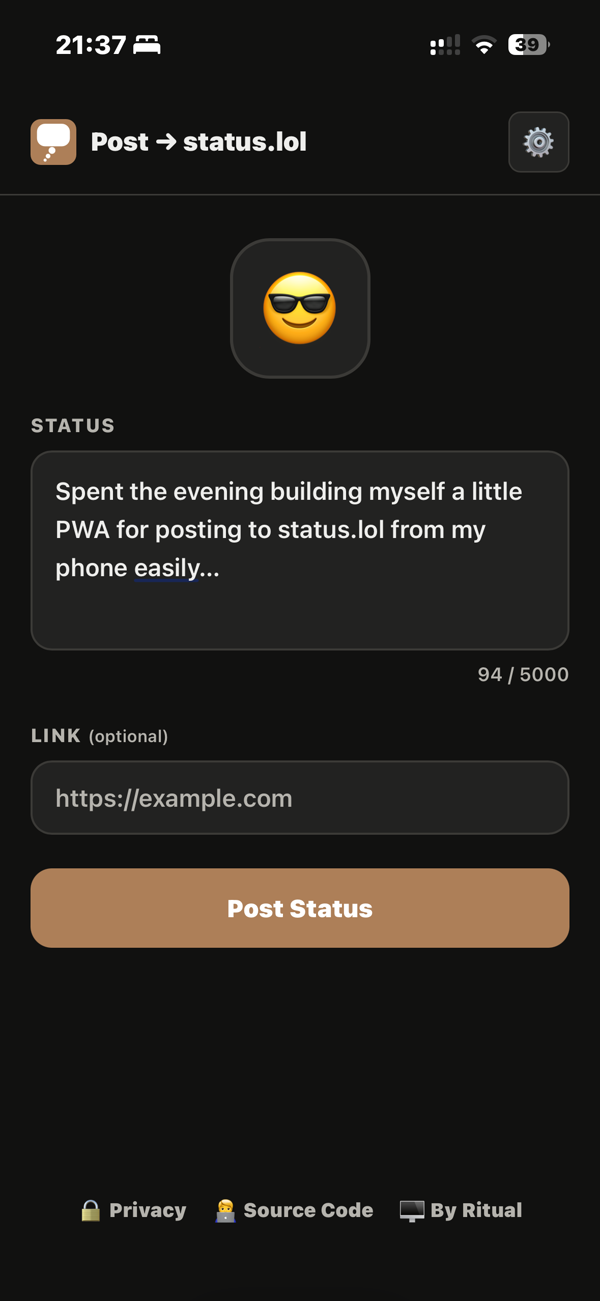
A lightweight PWA for posting status updates to status.lol (part of the omg.lol ecosystem). Pick an emoji, write a message, and optionally cross-post to Mastodon - all from a simple installable web app.
Your credentials are stored only in your browser's local storage and are never sent anywhere except the omg.lol API.
Screenshot
Features
- Emoji picker for status icons
- Up to 5,000 character status messages with live character count
- Optional URL attachment per status
- Optional Mastodon cross-posting with configurable visibility
- Auto/light/dark theme (respects system preference)
- Installable PWA
- No build step, no dependencies
Requirements
- An omg.lol account
- Your omg.lol API key (find it at home.omg.lol/account)
- Any HTTP server
Running Locally
-
Clone the repository:
git clone https://git.bkr.im/ritual/status-poster.git cd status-poster -
Serve the files over HTTP:
python3 -m http.server 8000Then open
http://localhost:8000in your browser. -
Open settings (the gear icon), enter your omg.lol username and API key, and save.
That's it.
Deployment
A deploy.sh script is included that you can use as a template for your own if you want. I pull directly from git and this script does that and then busts the bloody cache for me.
./deploy.sh
Dependencies
- emoji-picker-element — loaded from CDN, no install required